Local rank tracking that shows your whole area, every month
Monthly geo-grid heatmap reports from our own map-rank engine: where you show on Google Maps from dozens of points around you, who beats…
Searching your own business name tells you almost nothing. Here are five free ways to see where you really rank on Google Maps, how rank grids work, and a simple log to track it every month.
 Bharat BaghelSenior Writer · Google Business Profile & local SEOSEO Manager with 4+ years of SEO inside software companies, including ControlHippo and SoftwareSuggest. Writes our Google Business Profile, local SEO and website guides.Read full bio LinkedIn
 BuzzTech Labs Editorial TeamEditor · Local SEO researchChecks every BuzzTech Labs guide against Google's own help pages and policies before it goes live.Read full bio Contact us
12 min read
To check your Google Maps ranking, open the Google Maps app on a phone, turn on Incognito mode, and search the exact words a customer would type, such as "dentist near me" or "AC repair in Kothrud", from the area where your customers are. Count your position in the results, skipping anything marked "Sponsored". Then repeat from a few other spots, because your rank changes with every location. For a full picture, use a rank grid, which runs the same search from dozens of points around you.
That last line is the part most owners miss. There is no single "Google Maps rank". There's your rank for one keyword, from one spot, at one moment. This guide shows five free ways to check it properly, how rank grids work, how to read the results, and a copy-paste log so you can track it every month without guessing.
Searching your business name, or searching from your own desk, gives you a flattering and wrong answer. Google tailors results to the person searching, and you are the one person Google knows is closest to your business and most interested in it.
Google says local results are mainly based on three things: relevance (how well your profile matches the search), distance (how far you are from the searcher) and prominence (how well known you are, including reviews and links). That's from Google's own page, Tips to improve your local ranking. Distance is the one that fools people. Standing inside your clinic, you're zero metres away. A patient five kilometres away is not.
Google also uses more than your phone's GPS to work out where you are. Its help page on location in Google Search lists your device location, your saved home and work addresses, your past activity and your IP address. So a "quick check" from the office tells you how you rank for someone standing in your office. That's not who you're trying to reach.
Each free method answers a slightly different question. Use the first two for a quick reality check, the third to learn which searches matter, and the last two to fill in the gaps.
This is the closest free match to what a real customer sees. It takes five minutes.
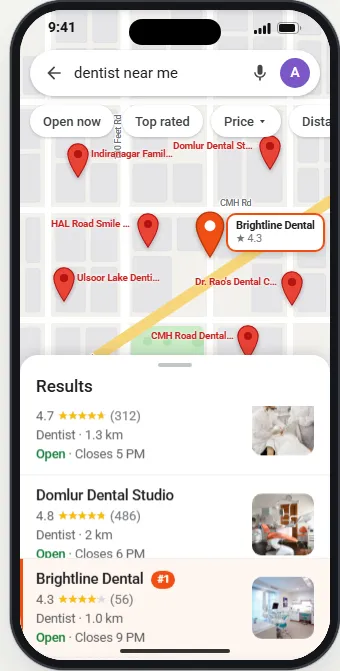
Even in Incognito mode, Google still knows roughly where your phone is. That's the point. You want the result for that spot. Just remember it's one spot.
You can't stand in ten places at once, but your team, family and regular customers already do. Ask three to five people in different parts of town to run the same search on their phones and send you a screenshot on WhatsApp or by text.
Give them one exact phrase to type, so you compare like with like. And ask them to tell you where they were standing. A plumber in Dallas might ask a technician to check from each job site for a week. A salon in Pune might ask staff to check on their commute. It's free, it's real, and it often reveals a surprise: you rank well on one side of the main road and vanish on the other.
Your Business Profile won't tell you your position, but it does show which searches brought people to you. Open your profile on Google, choose Performance, and look for the searches breakdown.
Google's help page on Business Profile performance says the searches section shows the terms people used to find your business. It also says that this data updates at the start of each month and can take up to five days to appear, and that performance data is only available for verified profiles. Views count each person once a day, so they can look lower than you expect.
Use this list to choose what to track. If "emergency dentist" brings in real searches, that's a keyword to check your position for. If a service you really want to grow, like implants, barely appears, that tells you Google doesn't yet connect your profile with it. Adding it as a service and picking the right Business Profile categories is usually the first fix.
If you have a Google Ads account, its Ad Preview and Diagnosis tool lets you preview a Google results page for a search term while choosing a location, language and device. Google says using it won't count as an ad impression, unlike searching Google yourself. It's built for ads, so treat the local results it shows as a rough guide, not a rank report. Its real value: you can "stand" in another city without leaving your chair.
People who search "checking SEO ranking" often want two things: their map position and their website position. Search Console covers the website half. It's free, and it shows the queries your pages appeared for, with clicks, impressions and an average position.
Read that average with care. Google explains in its guide to impressions, position and clicks that the position is the topmost spot your site held, averaged across searches, and that your own position may differ because of search history and location. It doesn't report your Google Maps listing, which is why you need methods 1 to 4 as well.
A rank grid runs the same Google Maps search from many points on a grid around your business and records your position at each one. It turns one guess into a map of where you're strong and where you disappear.
Picture a 5 by 5 square of 25 points laid over your neighbourhood, with your business at the centre. The tool searches "dentist near me" from each point and colours the result: green for the top three, amber for 4 to 10, red for 11 and below. Then you count how many of the 25 spots put you in the top three.
We search "dentist near me" from 25 spots around your business. Each dot shows where you rank from that spot.
0 of 25 spots in the top 3
Illustrative example from our profile simulator, not a client result. The pin is #7 at the front door, but the clinic is in the top 3 at none of the 25 spots. That's why one search from the office misleads.
That one grid tells the story most owners never see. Checking from the clinic, you'd say "we're seventh". Across the area your patients actually come from, you're closer to fifteenth, and in the top three nowhere.
Several geo-grid tools offer free credits, free trials or limited free plans, and the limits change often. Check each tool's current terms on its own site before you rely on it. Paid tools add scheduled scans, competitor rankings at each point and history charts. If you'd rather not run any of this yourself, our local rank tracking service sends you a monthly grid with a plain-English summary.
Match the method to the question you're asking. Each one is good at one job and poor at the rest. Use this table to pick.
| Your question | Best method | Cost | Limit |
|---|---|---|---|
| Is my profile live and showing at all? | Search your exact business name | Free | Says nothing about new customers |
| Where do I rank right here, right now? | Maps Incognito search on your phone | Free | One spot, one moment |
| Do I rank across town? | Friends or staff send screenshots | Free | Slow, and people type differently |
| Which searches bring people to me? | Business Profile Performance, searches | Free | No positions, monthly updates |
| How do I look from another city? | Ad Preview and Diagnosis tool | Free with an Ads account | Made for ads, rough for local results |
| Where do my website pages rank? | Google Search Console | Free | Website only, not your Maps listing |
| Where am I strong and weak on the map? | Rank grid | Free credits, then paid | Needs fixed settings to compare |
Your position moving between two checks is normal. Most changes come from how the check was done, not from Google punishing you. Here are the common reasons and what to do about each.
| What you see | Likely reason | What to do |
|---|---|---|
| #1 from your desk, missing for customers | Distance and your own search history | Check in Incognito from customer areas |
| Different rank on phone and laptop | Different location signals (GPS vs IP address) | Use a phone, with location on, for local checks |
| Rank changes from morning to evening | Results shift through the day, and some people filter by "Open now" | Check at the same time of day each month |
| "Near me" and "in [city]" give different lists | Different searches, different results | Track both if customers use both |
| Strong on one side of a highway, gone on the other | Distance plus nearby competitors | Normal. Build reviews and local relevance |
| Sudden drop everywhere | Profile edits, a suspension, or a wrong category | Check your profile for changes and warnings |
| Competitor jumped above you overnight | New reviews, new category, or keyword-stuffed name | Compare their profile with yours |
One thing is never the reason: someone paying Google. Google's ranking page states, "There's no way to request or pay for a better local ranking on Google." Ads exist, but they carry a "Sponsored" label and sit apart from the unpaid results.
The simplest way to track progress is one row per check in a spreadsheet. Copy these columns into Google Sheets or Excel and fill a row every time you check. After three months you'll see real trends instead of guesses.
| Date | Keyword | Where checked | Method | Your position | Top 3 that day | Notes |
|---|---|---|---|---|---|---|
| 1 Nov | dentist near me | School gate, 2 km north | Maps Incognito | 5 | Clinic A, B, C | Two new reviews this week |
| 1 Nov | dentist near me | Mall car park, 3 km east | Maps Incognito | 11 | Clinic B, D, E | Competitor D added photos |
| 1 Nov | emergency dentist | Rank grid, 5 by 5, 1 km | Grid tool | Avg 8.4 | 9 of 25 in top 3 | Same settings as October |
Three rules keep the log honest. Check on the same day each month. Use the same places or the same grid. Write a note when you change something on your profile, such as adding services, so you can link cause and effect later.
The pattern of your results tells you which ranking factor is holding you back. Here's how to read the three most common patterns.
We search "dentist near me" from 25 spots around your business. Each dot shows where you rank from that spot.
0 of 25 spots in the top 3
13 of 25 spots in the top 3
Illustrative example, not a client result. Real results depend on your area and your competition.
For the full list of fixes in priority order, see our guide on how to rank higher on Google Maps, and our breakdown of local search ranking factors. Once you have numbers, a monthly keyword ranking report helps you share them with partners or staff.
Check once a month. Daily checks mostly show noise, and they make owners panic over small moves that undo themselves by the weekend.
Monthly works because the things that move rankings, such as new reviews, new services, fresh photos and posts, build up over weeks. A good routine is a rank grid for your two or three most important keywords on the first of each month, plus a quick Incognito check whenever you change something big, like your category or address. Then spend the rest of your time on the work that moves the numbers, not on watching them.
You can set up honest rank tracking in under an hour. Here's the order.
If you'd rather hand this off, our Google Business Profile management Growth plan includes a monthly local rank-grid report and tracking of your top three nearby competitors, alongside the work that moves the grid. See every plan on our plans page, check what we do for dental clinics and other local businesses, or ask us for a free look at your profile.
Open the Google Maps app, turn on Incognito mode from your profile picture, and search the words a customer would use, such as 'dentist near me', from the area they live in. Count your position in the list, skipping ads. Repeat from a few spots and write the results down.
Google personalizes results using your location, past searches and activity. If you search from inside your own building, you're as close as anyone can be, and Google knows you've visited your profile before. Customers a few kilometres away see a different list.
Once a month is enough for most local businesses. Rankings move a little every day, so daily checks mostly show noise. Check on the same day each month, with the same keywords and from the same points, so you can compare one month with the next.
It's a tool that runs the same Google Maps search from many points on a grid around your business, such as 25 points in a 5 by 5 square. It shows your position at each point as a coloured dot, plus an average rank across the whole area.
Partly. In your Business Profile, open Performance and look at the searches breakdown. It lists the search terms that showed your profile and roughly how often. Google updates it at the start of each month. It doesn't show your position for each term.
No. Search Console reports positions for your website in Google Search results. Your Google Maps listing is tracked separately in your Business Profile. Use both: Search Console for your website pages, and Maps checks or a rank grid for your profile.
No. Google says there's no way to request or pay for a better local ranking. You can pay for ads, which appear with a 'Sponsored' label, but ads don't change your unpaid position. Rankings come from relevance, distance and how well known your business is.
Monthly geo-grid heatmap reports from our own map-rank engine: where you show on Google Maps from dozens of points around you, who beats…
 Google Maps & Local SEO
Google ranks local businesses on relevance, distance and prominence. Here is what each one means in practice, what to fix first, and a 90-day plan for dentists, clinics and makeup artists.
 Google Maps & Local SEO
Google names three things: relevance, distance and prominence. Experts break those into 187 factors. Here is which ones move your map rankings, which ones hurt, and which are a waste of your week.
 Google Business Profile
A plain-English walkthrough of every field that matters on your Google Business Profile, in the order we set them up, plus the weekly routine that keeps a profile ranking.